Check the claim that could waste your next hour of implementation. This walkthrough turns a REA explanation into a short evidence ledger, runs four tests against a real export handler, and corrects two assumptions before they become requirements.
Pocket Notes 1.0.0 exports notes through an Electron preload bridge and a main-process handler. Its available source makes each finding checkable.
- Download the fixture, full REA evidence and runnable tests in the verification kit.
- Use the worksheet pack to record your own claims.
- If REA is not connected yet, begin with Claude Code setup.
The tests ran on macOS 26.6.2 with Node 24.22.1 and REA 6.8.0 on 31 October 2026. They load the fixture’s actual handler with mocked Electron-dialog and file-write dependencies. They do not open native windows or write files to disk.
Jump to a step
- 1. Split the explanation into checkable claims
- 2. Trace references through the branch that matters
- 3. Run controls that distinguish the alternatives
- 4. Correct the brief and keep unresolved work visible
What each kind of evidence establishes
| Evidence | What you can say | What remains separate |
|---|---|---|
| File and source location | The inspected artifact contains this code | Whether that path executes in the real app |
| Static REA relationship | Syntax supports this candidate connection | Runtime registration, reachability and enforcement |
| Controlled handler test | These inputs produced these results under the stated dependencies | Native UI and operating-system integration |
| End-to-end observation | The complete flow worked in the tested environment | Other inputs, versions and environments |
State the scope next to each result so readers know which decision it supports.
1. Split the explanation into checkable claims
Start with one feature, not the whole app. Our example asks: What happens when a person exports a note, cancels, or encounters a write failure?
The renderer screenshot below shows the beginning of the route. It is useful evidence for a source-level relationship, but it cannot establish everything that follows.
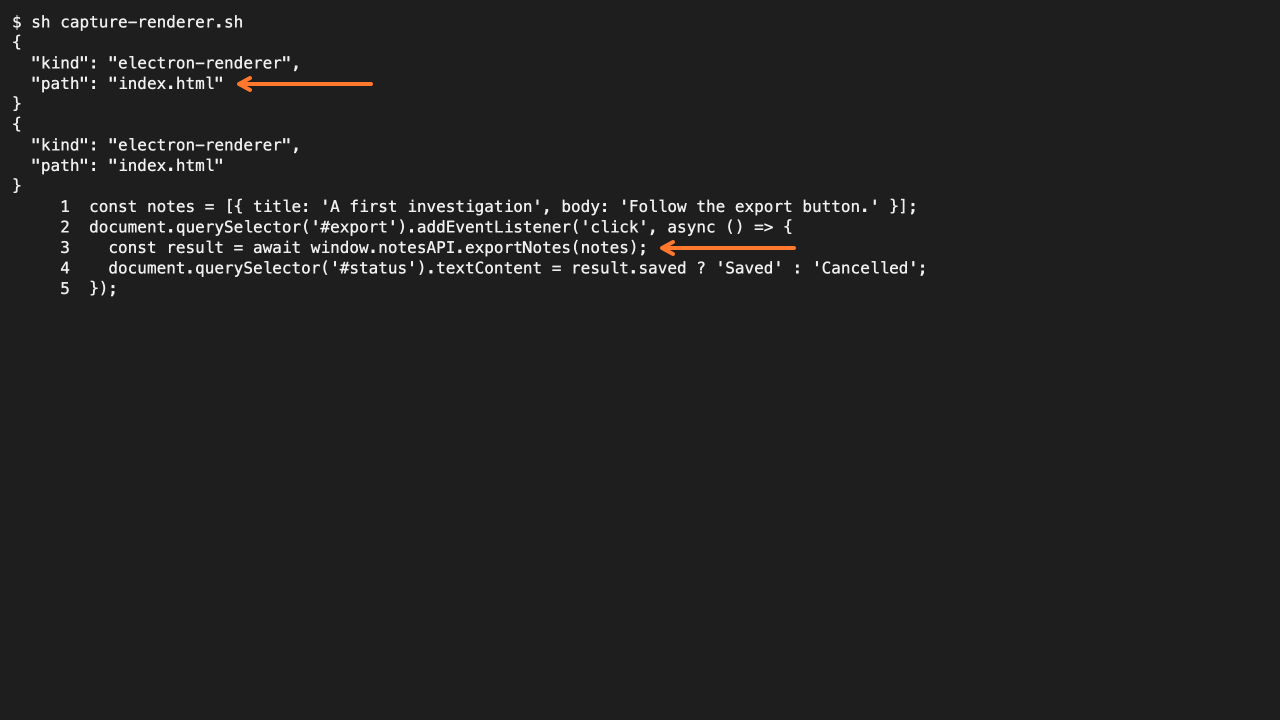
Earlier source capture from the same Pocket Notes learning fixture. It shows code, not a running export interaction.
Separate the explanation into rows that can fail independently:
| ID | Claim to investigate | First evidence or check |
|---|---|---|
| C1 | The export control calls the exposed notes API | Inspect renderer.js and preload.cjs |
| C2 | Canceling avoids a write | Inspect the handler and invoke its cancellation branch |
| C3 | Quotes and commas are preserved in CSV formatting | Compare the exact emitted text |
| C4 | Selecting a path guarantees success | Make the write dependency reject |
| C5 | The native dialog saves a usable file | Run the complete Electron flow separately |
C4 is a deliberately tested editorial hypothesis, not a claim attributed to REA. When correcting an actual model error, preserve its wording alongside the correction.
Add target version, source reference, proposed test, observed result and remaining uncertainty to each row. The prompt pack provides a format for requesting that ledger from an agent.
2. Trace references through the branch that matters
Open the cited locations and follow the specific path. In this fixture, renderer.js calls window.notesAPI.exportNotes(notes), the preload invokes notes:export, and main.cjs registers the matching handler.
The complete REA result in the kit reports three parsed JavaScript files, zero parse failures and one paired renderer transmission. Those counts help locate the relationship; they do not replace reading the condition that decides whether a write happens.
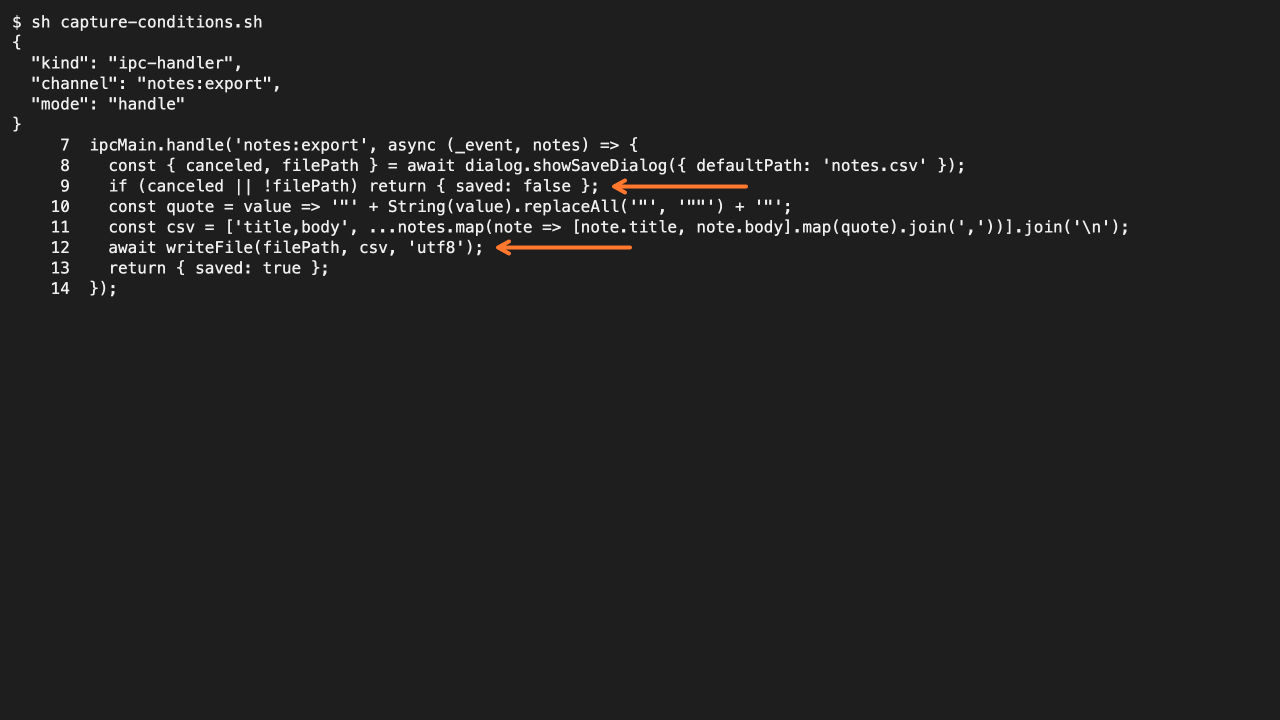
Actual source excerpt. The cancellation and awaited-write branches define the tests below.
Inspect these details in main.cjs:
canceled || !filePathreturns{ saved: false }beforewriteFile.- Values are converted to strings and enclosed in double quotes.
- Embedded double quotes are doubled.
writeFileis awaited before{ saved: true }is returned.
That final ordering changes the claim. A selected path is necessary for this success route, but it is not sufficient: the write can reject.
Use the same discipline for configuration. An endpoint listed in a file establishes a configured value; it does not establish an observed network connection. Connectivity does not establish successful target analysis.
When a reference is missing, ambiguous or outside the available artifact, mark the claim unresolved. If the key evidence is inaccessible, reconsider the target or scope rather than letting an attractive explanation fill the gap.
3. Run controls that distinguish the alternatives
Extract the kit, open its directory and run:
node verify-claims.cjs ./pocket-notesThe script loads the original main.cjs. It supplies controlled dialog responses and records the arguments passed to the write dependency. A separate case makes that dependency throw an EACCES error.
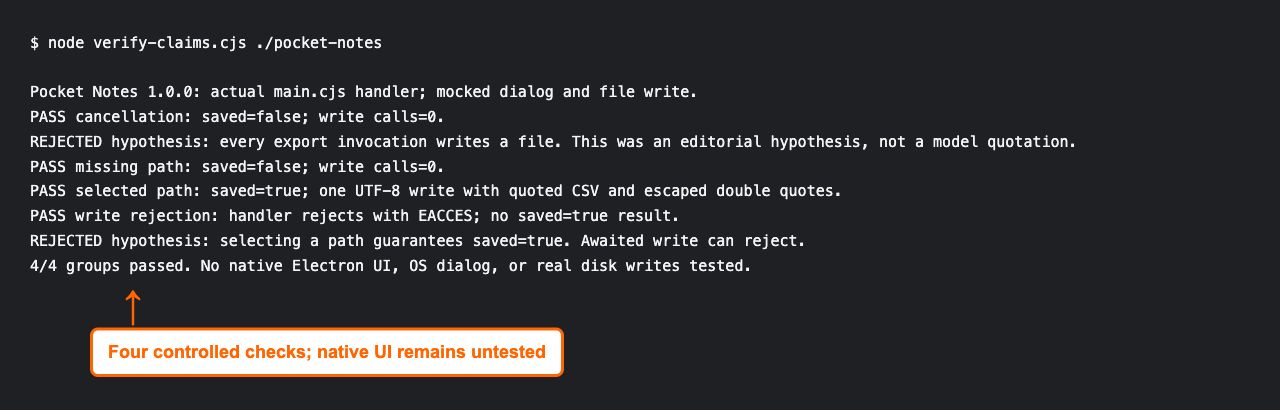
Actual test output. Native Electron UI, operating-system dialogs and real disk writes were not exercised.
The observed results were:
| Case | Input or dependency behavior | Observed result |
|---|---|---|
| Cancel | Dialog returns canceled: true |
saved: false; zero write calls |
| Missing path | No filePath returned |
saved: false; zero write calls |
| Selected path | Write resolves | One UTF-8 write with quoted CSV; saved: true |
| Write rejected | Write throws controlled EACCES |
Handler rejects; no saved: true result |
All four groups passed. The quoting test includes a title with double quotes and a body containing a comma and newline. It compares the exact CSV string, so a plausible-looking screenshot is not the test oracle.
The controls reject both broad success hypotheses. They do not establish useful renderer error messages or compatibility with another application.
For that next level, launch an appropriate Electron build, exercise the real dialog, inspect the saved file and test the visible failure behavior. Record those results separately; this guide does not claim to have run them.
4. Correct the brief and keep unresolved work visible
Change the implementation brief using the result, not the confidence of the original explanation. A useful corrected requirement is:
Return
saved: falsewithout requesting a write when the dialog is canceled or provides no path. Return success only after the write resolves. Specify and test the user-facing behavior for a rejected write separately.
That requirement is narrower and more actionable than “export works.” It identifies the successful branch, the two no-write branches, and an unresolved interface decision.
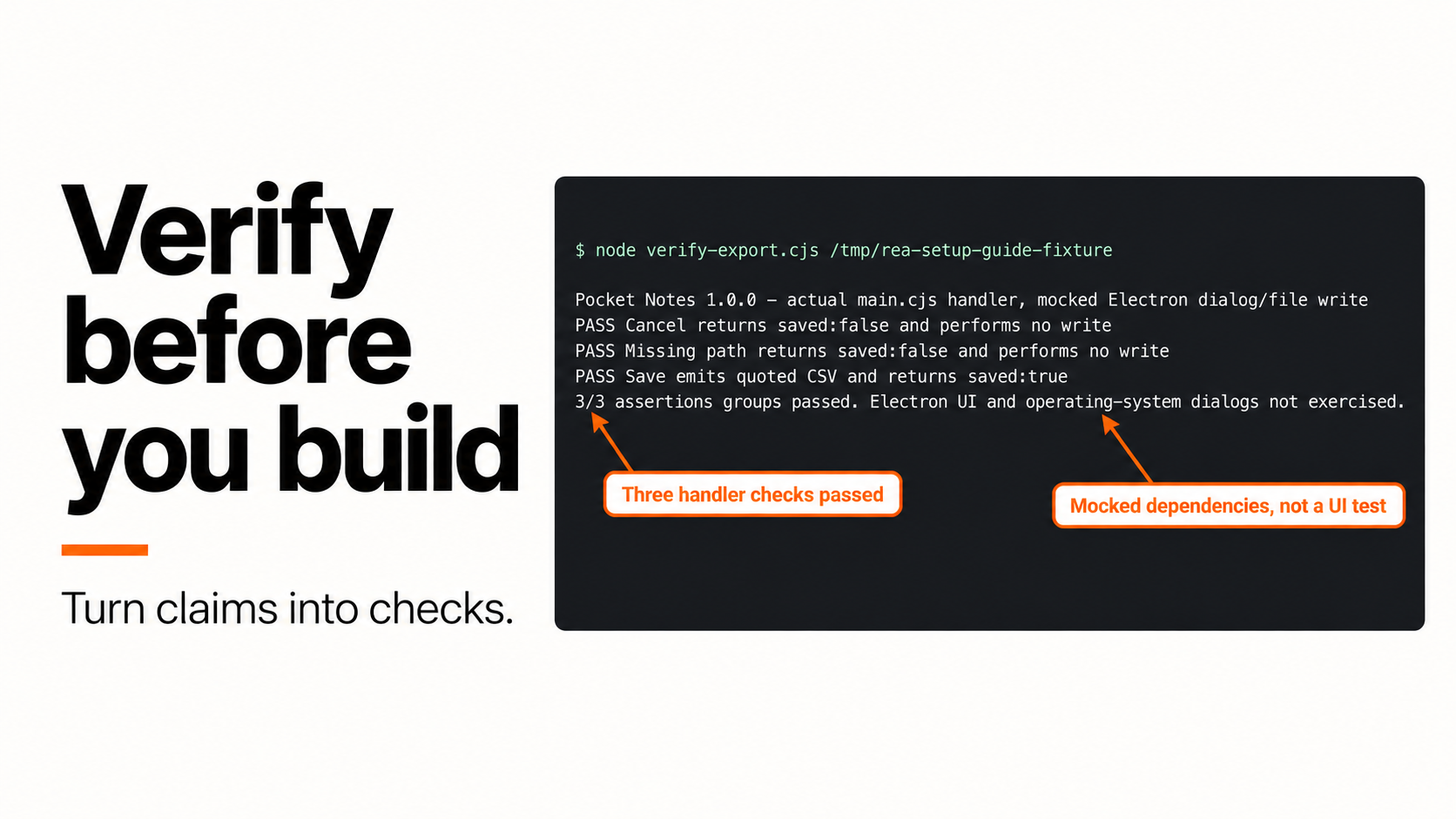
The setup guide originally demonstrated three handler checks. The capture below is that earlier baseline; this verification guide adds the fourth, write-rejection check shown above.
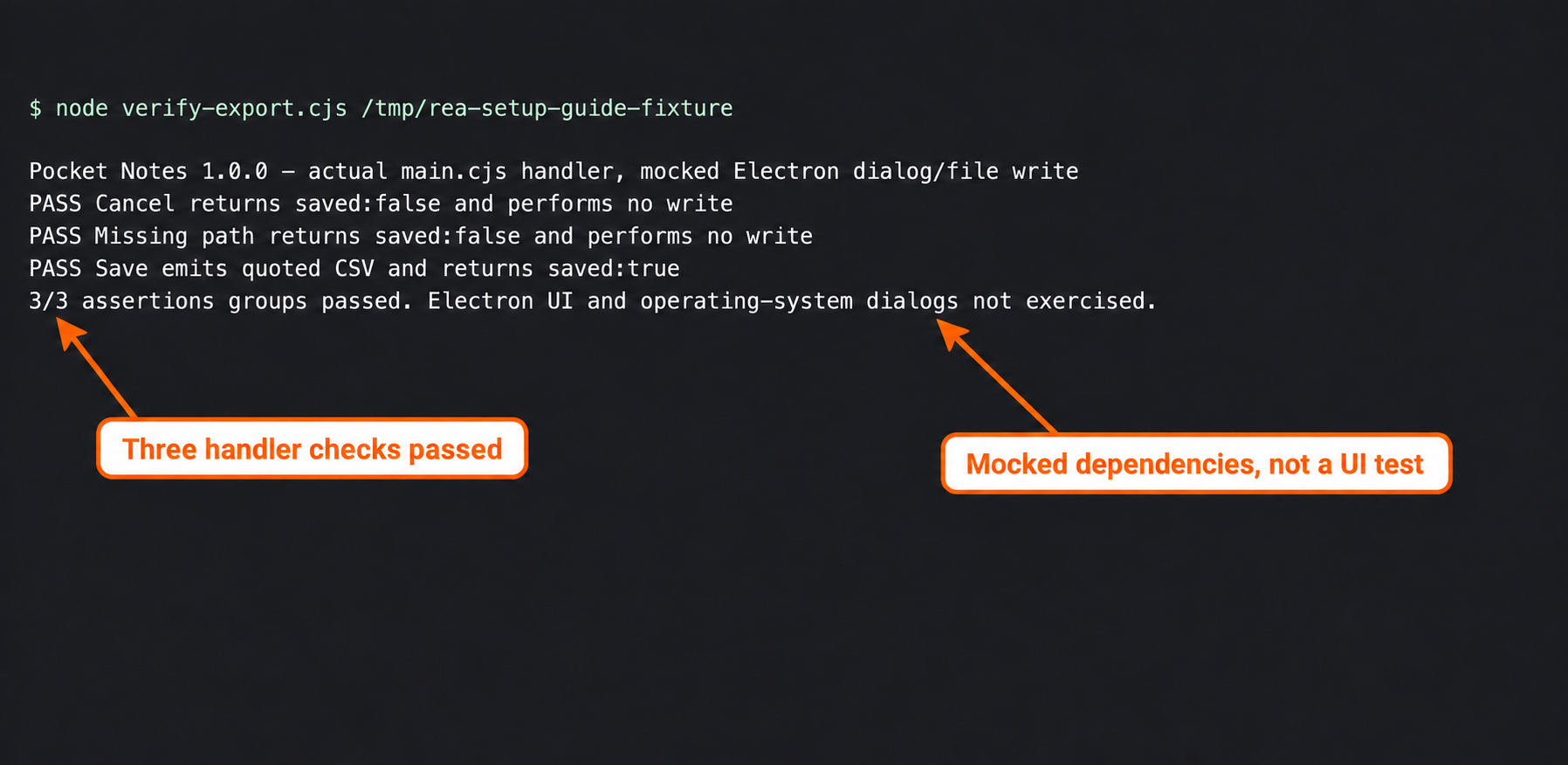
Three-check baseline from the setup walkthrough, not the four-check result of this page.
Finish the ledger with explicit outcomes:
- Supported: cancellation and missing-path branches avoid a write under the harness.
- Supported within scope: the selected-path case emits the expected quoted CSV.
- Corrected: choosing a path does not guarantee success if writing fails.
- Unknown: native-dialog behavior, real disk output and the renderer’s handling of write rejection.
Rerun affected tests after changes. Retain failures and corrections. Four passing cases are not a product-wide accuracy percentage.
Use the result to choose the next task
Implement from the supported handler contract, then test the remaining integration gap. Complete desktop-export reliability remains unverified.
The approach follows REA’s evidence workflow: retain the artifact result and its limitations rather than treating a selected view as the entire investigation. For a contrasting native example, the DX-Ball sound study shows why a bounded function comparison is more defensible than claiming a complete recovered game.
When deciding whether additional investigation is worth the effort, use the REA versus plain Claude Code guide. Carry the same acceptance tests into either workflow so an improved explanation still has to pass the checks that matter.